洞察力{#insights}
處理大型專案不應該覺得是件苦差事。事實上,它應該和兩星期前才開始的專案一樣令人愉快。之所以不是這樣,其中一個原因是隨著專案的成長,開發人員的經驗會受到影響。建立時間增加,測試變得緩慢且不穩定。我們通常很容易忽略這些問題,直到這些問題變得難以忍受為止
- 然而,到了那個時候,我們就很難解決這些問題了。Tuist Insights 可為您提供工具來監控專案的健康狀況,並在專案擴充時維持富有成效的開發人員環境。
換言之,Tuist Insights 可協助您回答下列問題:
- 過去一週的建置時間有顯著增加嗎?
- 我的測試變慢了嗎?哪些測試?
Tuist Insights 正處於早期開發階段。
建立{#builds}#
雖然您可能對 CI 工作流程的效能有一些指標,但對於本機開發環境,您可能沒有相同的能見度。然而,本機建立時間是影響開發人員經驗的最重要因素之一。
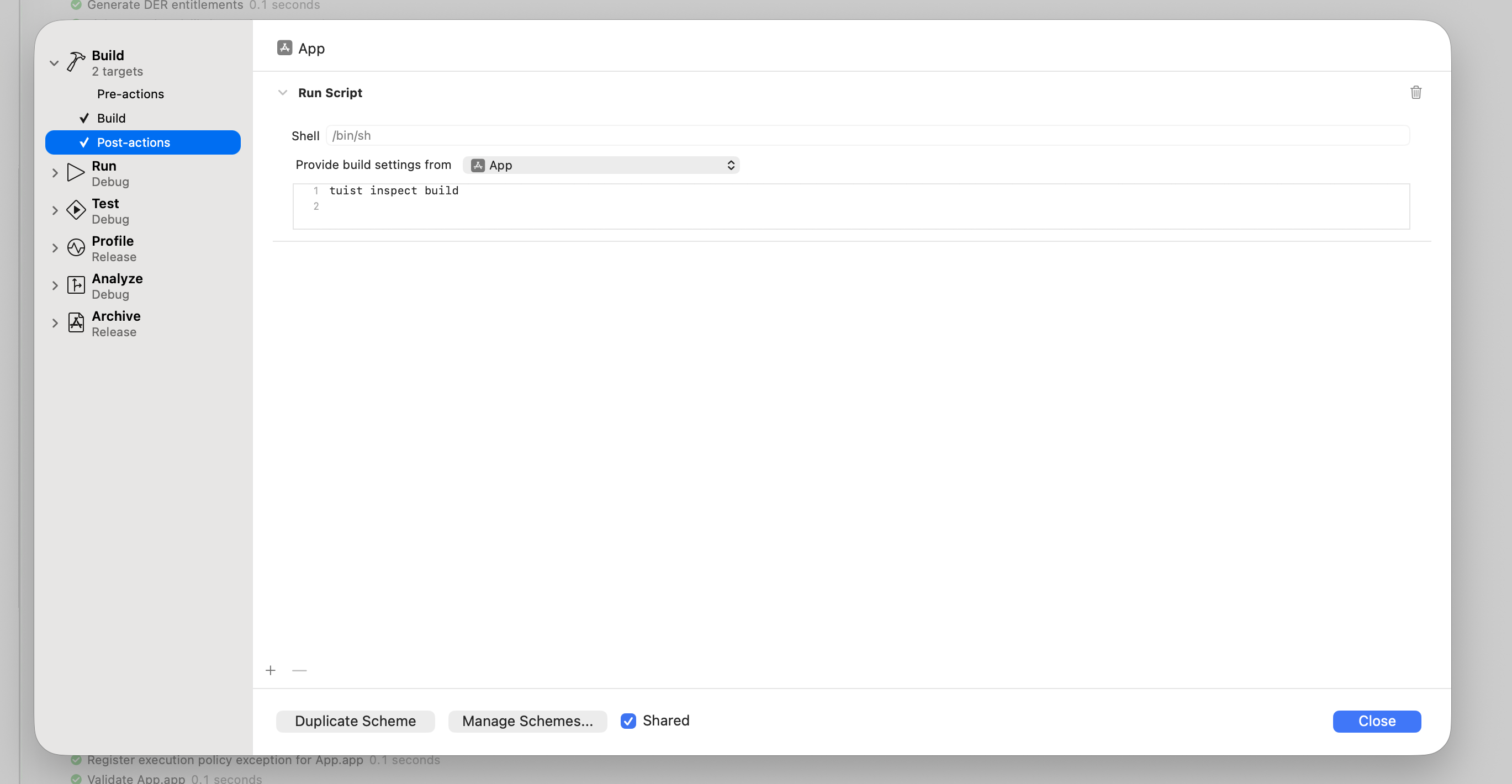
若要開始追蹤本地的建立時間,您可以利用tuist inspect build 指令,將它加入您的方案後動作中:
 。
。
我們建議將「Provide build settings from」設為可執行檔或您的主要建立目標,以便 Tuist 追蹤建立設定。
如果您沒有使用 產生的專案,在建立失敗的情況下,post-scheme 動作不會被執行。
即使在這種情況下,Xcode 中一個未記錄的功能也允許您執行它。設定屬性
runPostActionsOnFailure為YES在您的方案的BuildAction在相關的project.pbxproj檔案中,如下所示:<BuildAction buildImplicitDependencies="YES" parallelizeBuildables="YES" + runPostActionsOnFailure="YES">diff
如果您使用 Mise,您的腳本需要在動作後的環境中啟動tuist :
# -C ensures that Mise loads the configuration from the Mise configuration
# file in the project's root directory.
$HOME/.local/bin/mise x -C $SRCROOT -- tuist inspect build
您的環境的PATH 環境變數不會被 scheme post 動作繼承,因此您必須使用 Mise 的絕對路徑,這將取決於您如何安裝
Mise。此外,別忘了從專案中的目標繼承建立設定,如此您才能從 $SRCROOT 指向的目錄執行 Mise。
只要您登入 Tuist 帳戶,您的本機建立時間就會被追蹤。現在您可以在 Tuist 面板中存取您的建立時間,並查看它們如何隨著時間演進:
若要快速存取儀表板,請從 CLI 執行tuist project show --web 。
 。
。
測試{#tests}#
除了追蹤建立之外,您也可以監控您的測試。測試洞察可協助您識別緩慢的測試或快速瞭解失敗的 CI 執行。
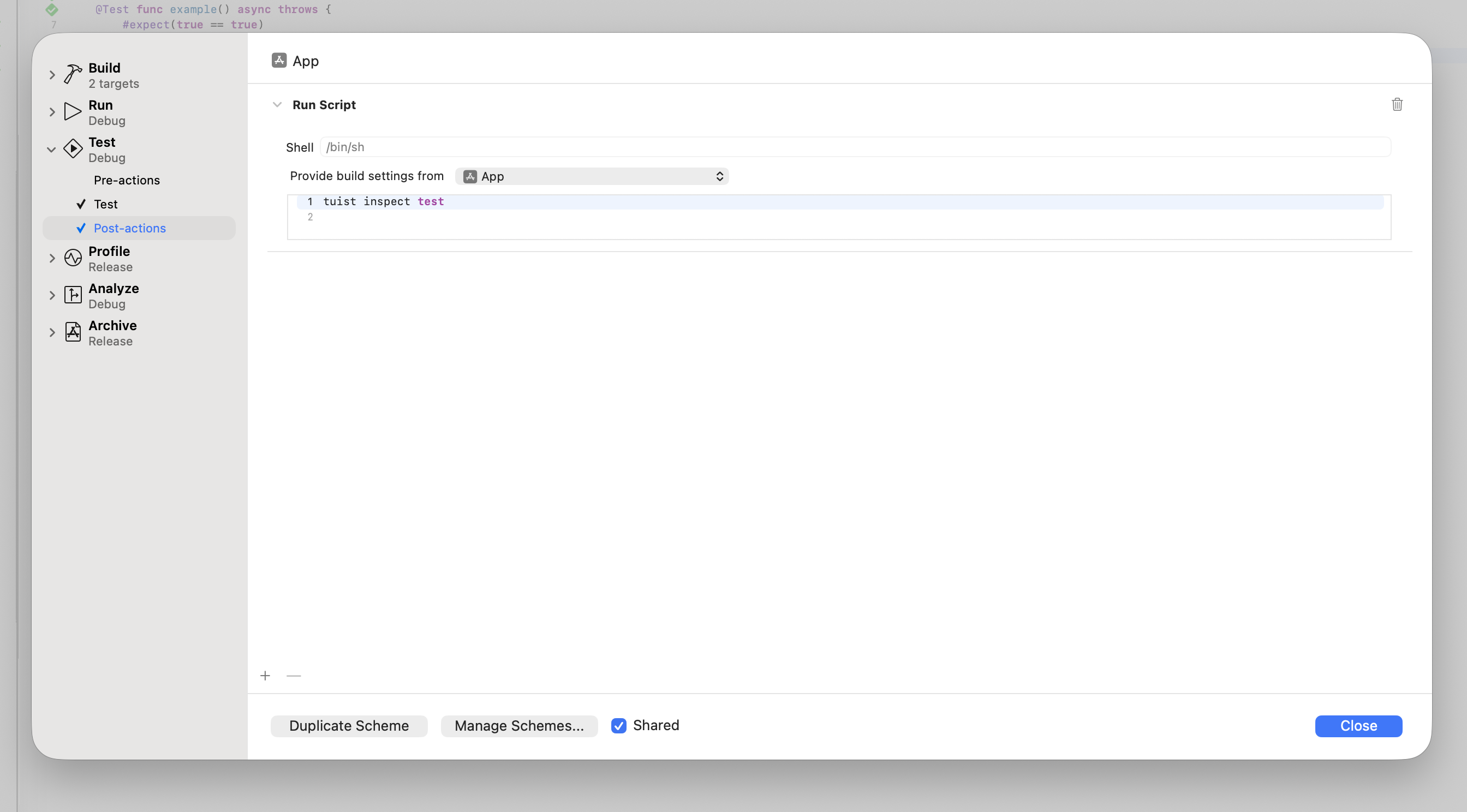
要開始追蹤您的測試,您可以利用tuist inspect test 指令,將它加入您的方案測試後的動作:
 。
。
如果您使用 Mise,您的腳本需要在動作後的環境中啟動tuist :
# -C ensures that Mise loads the configuration from the Mise configuration
# file in the project's root directory.
$HOME/.local/bin/mise x -C $SRCROOT -- tuist inspect test
您的環境的PATH 環境變數不會被 scheme post 動作繼承,因此您必須使用 Mise 的絕對路徑,這將取決於您如何安裝
Mise。此外,別忘了從專案中的目標繼承建立設定,如此您才能從 $SRCROOT 指向的目錄執行 Mise。
只要您登入 Tuist 帳戶,您的測試運行現在就會被追蹤。您可以在 Tuist 面板中存取您的測試洞察,並查看它們如何隨著時間演變:
 。
。
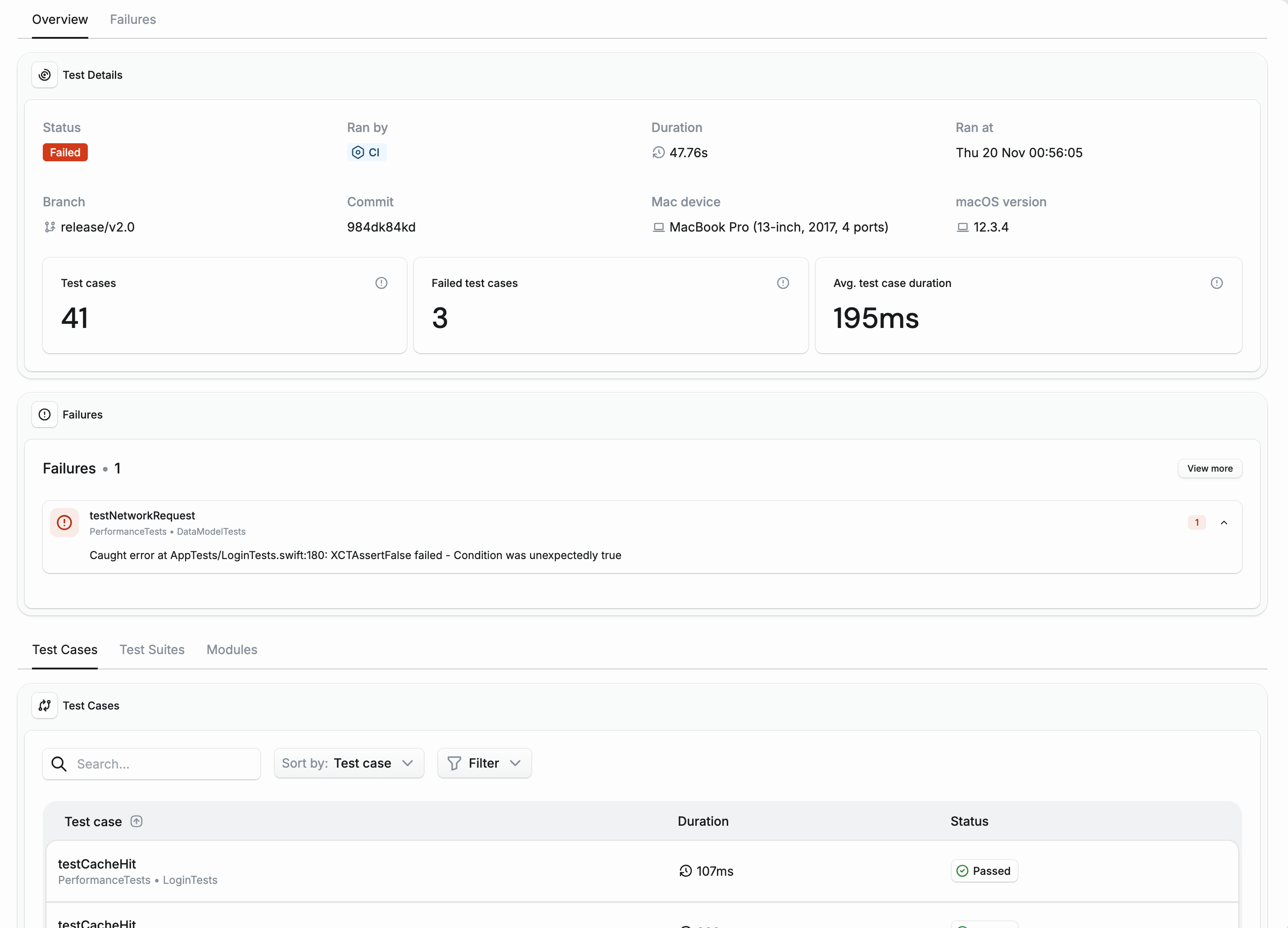
除了整體趨勢之外,您也可以深入研究每一個測試,例如在 CI 上除錯失敗或緩慢的測試時:
 。
。
產生的專案{#generated-projects}#
自動產生的方案會自動包含tuist inspect build 和tuist inspect test 後動作。
如果您對在自動產生的方案中追蹤洞察力不感興趣,請使用
buildInsightsDisabled和
testInsightsDisabled產生選項停用它們。
如果您使用的是具有自訂方案的已產生專案,您可以為建立與測試洞察設定後續動作:
let project = Project(
    name: "MyProject",
    targets: [
        // Your targets
    ],
    schemes: [
        .scheme(
            name: "MyApp",
            shared: true,
            buildAction: .buildAction(
                targets: ["MyApp"],
                postActions: [
                    // Build insights: Track build times and performance
                    .executionAction(
                        title: "Inspect Build",
                        scriptText: """
                        $HOME/.local/bin/mise x -C $SRCROOT -- tuist inspect build
                        """,
                        target: "MyApp"
                    )
                ],
                // Run build post-actions even if the build fails
                runPostActionsOnFailure: true
            ),
            testAction: .testAction(
                targets: ["MyAppTests"],
                postActions: [
                    // Test insights: Track test duration and flakiness
                    .executionAction(
                        title: "Inspect Test",
                        scriptText: """
                        $HOME/.local/bin/mise x -C $SRCROOT -- tuist inspect test
                        """,
                        target: "MyAppTests"
                    )
                ]
            ),
            runAction: .runAction(configuration: "Debug")
        )
    ]
)
如果您沒有使用 Mise,您的腳本可以簡化為
buildAction: .buildAction(
    targets: ["MyApp"],
    postActions: [
        .executionAction(
            title: "Inspect Build",
            scriptText: "tuist inspect build",
            target: "MyApp"
        )
    ],
    runPostActionsOnFailure: true
),
testAction: .testAction(
    targets: ["MyAppTests"],
    postActions: [
        .executionAction(
            title: "Inspect Test",
            scriptText: "tuist inspect test"
        )
    ]
)
持續整合{#continuous-integration}#
若要追蹤 CI 上的建立與測試洞察,您需要確保 CI 已經 驗證。
此外,您還需要:
- 調用
xcodebuild動作時,請使用tuist xcodebuild指令。 - 將
-resultBundlePath加入您的xcodebuild調用。
當xcodebuild 在沒有-resultBundlePath 的情況下建立或測試您的專案時,不會產生所需的活動記錄和結果束檔案。tuist inspect build 和tuist inspect test 後動作都需要這些檔案來分析您的建立和測試。