How we built an AI-first operations platform at Tuist
There was a time when I used to go running, and it was the perfect opportunity to listen to podcasts. I had started a business with Marek, and my interests gravitated towards stories from people who had made a similar transition, or whose way of running companies I respected. One of those days, I listened to Tobi Lütke’s interview with David Senra. Tobi is the co-founder of Shopify, the company that employed me before I started this entrepreneurial journey.
Some of the points he touched on were familiar, but one stayed with me: the moment he decided to approach the company itself as something he could engineer. As he put it:
“What does my intuition say about what a company actually should look like?”
Tobi Lütke, in his conversation with David Senra.
I had witnessed results of that work, including Flex Comp, a compensation system that gave employees more control over their compensation. As an engineer, my natural reaction was to wonder: how would we engineer Tuist around the way we wanted to work?
At the time, we did what made the most sense: buy most of the solutions that weren’t core to the business. One solution for support here, another for customer relationship management there, and a tool for errors and observability... We built the system by buying tools that felt right and made sense financially.
However, something kept bothering me. I tend to think in systems, and I saw dependencies across services, the same entities modeled in several places, and layers of indirection moving state around to keep everything in sync. Each tool solved its part of the problem, but we wanted a simpler model for the whole. Buying made sense when we couldn’t afford to build these things ourselves. The resulting system just didn’t quite match how we wanted to operate.
At the same time, when you’re building a company for the first time, it’s easy to wonder how you’ll find your place among organizations with far more resources. That was intimidating. We had to be deliberate about where our money and attention went, and we kept coming back to the things we cared about: making good products, helping people use them, and sharing what we learned along the way.
Being small also gave us room to experiment. We could still change how the whole company worked without having to coordinate across many teams. Around the same time, coding agents were changing the economics of building software. Those two things connected beautifully with the idea of engineering the company.
We were four people, and the cost of building something was going down. So we thought: what if we engineered the organization around efficiency, while preserving the quality and level of care we wanted to bring to our work? The kind of care I’m trying to put into this post, so there’s something useful here for others to draw inspiration from.
We wanted to own more of the organization’s context and build a system around it, leaning on agents for work we could automate and bringing ourselves into the parts where we could contribute most. We started with how we wanted to work. We went domain by domain, understood what we needed, and modeled it in a central place that we named Atlas. Turns out it’s a popular name, but we like it.
Ideas became database tables, migrations, dashboard interfaces, tools exposed through the Model Context Protocol (MCP), and business logic that reflected how we wanted to work in each area.
This isn’t something we would have considered before LLMs, because we couldn’t justify the cost. I had seen Shopify invest in its own tools, but doing something similar had felt out of reach for a team our size.
And this, weirdly, creates a crazy momentum. The more features you bring in and wire together, the more possibilities you see. What used to be scattered pieces of context become database relationships, forming a graph of the organization. I’ve never been part of a transition from a microservices architecture to a monolith, but this is how I imagine it must feel. Information comes together, and connections that used to require another integration become something you can query directly. It’s like being given a blank canvas and letting the oil colors flow through your hand and brush.
For us, that investment serves the main business. We want to spend more time improving Tuist and caring for the people who use it, and less time moving information between systems. I handle many of the operations beyond product development, mostly through Codex or Claude, because they have access to that shared context. I’m not an expert in every domain, but getting my hands dirty helps me learn where we need someone’s expertise and where our existing tools are enough.
I find that part fun, too. Engineering the organization, like Tobi described, gives us a chance to make our beliefs concrete. One of those beliefs is that care compounds. If we keep doing useful work and looking after the people who trust us, I believe a healthy business can grow from that. It’s a long-term bet.
Back to Atlas, because I’ve wandered quite far from it. I wrote about it before, when sales was still a big part of how I thought about it. It has since grown further into our operations platform, and I thought it was a good time for a 2.0 of that post: what has landed since, how we approached each domain, and the role agents played in it.
We’ve built this with coding agents, on top of investments we’re grateful we made: Noora, the design system that powers the Tuist dashboard; Elixir, which we’ve become comfortable with in development and production; and Kubernetes, which gave us the foundation to deploy and operate another service.
The next ingredient is knowing how to turn a need into a product feature. That’s a part of development I’ve always enjoyed, and it’s why coding agents clicked for me. Suddenly I could explore ideas that had previously felt beyond our capacity, including building a build system. Everyone on the team brings that curiosity and care, and that mattered just as much as the technology when we decided to invest in Atlas.
One aside: the tools we used were good at their jobs. What we wanted to simplify was the system around them, especially since we only needed a small part of what each offered. We also wanted one place to manage access and one agent interface that could work across the context we gave it. At Tuist, we like simplicity. A lot. For a team of four, maintaining that smaller system felt like an investment worth making.
Let’s talk about sales.
Sales: customer context and proof-of-concept tracking
As developers ourselves, we appreciate being able to test a product without a lot of bureaucracy. We build trust when the people on the other side understand the problem and can go deep with us. That’s the experience we want to offer.
So we put our energy into doing good work and talking about it, like I’m doing in this post. Care for the craft is contagious. When someone finds their way to us and shows interest, we need a system to keep track of what’s happening with their organization. People call them leads or prospects, depending on the phase. I’ve never warmed to that terminology. To me, they’re people or organizations interested in solving a problem with our products. Punto.
We want to understand how their evaluation is evolving, a bit like an archaeology of their interaction with the product, so we can help them reach the results they expect. We built the sales section around that relationship. It captures context from Slack, email conversations, and meeting transcripts, with room to paste text or images when the context isn’t easy to collect automatically.
This lets us have conversations backed by data. I recently linked organizations to their proofs of concept, each with a public, read-only page that teams can use to follow the evaluation from the beginning, including the context we gathered on the first call. The page is customized to the customer... because details matter.
We also connected accounts to their platform usage, so we can see which features they’re using. Keeping that history creates room for another feature we’ve been developing: Nudges, inspired by a call with Grafana’s sales representative.
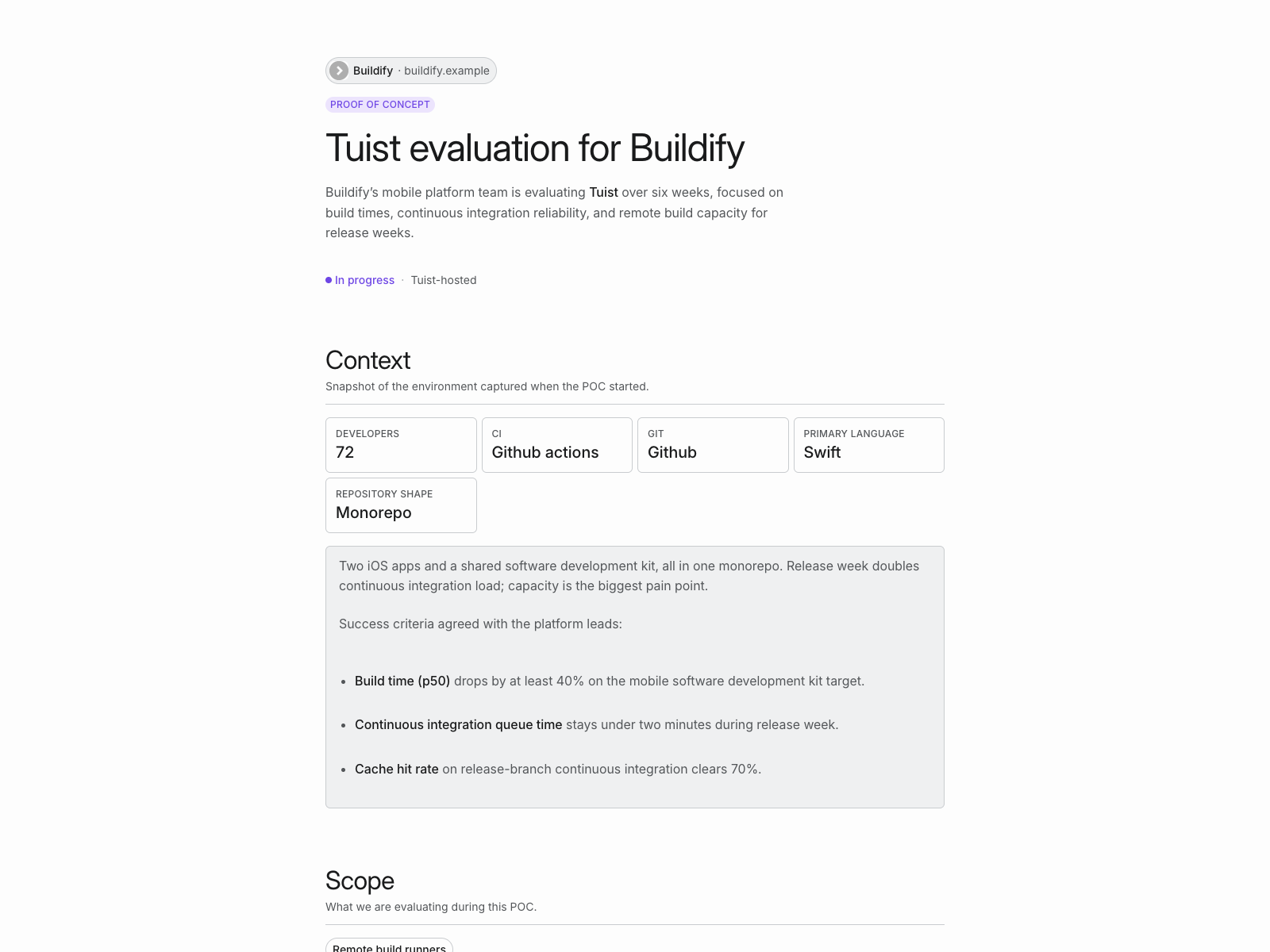
The Buildify proof of concept and all data in this screenshot are fictional and exist only in the local Atlas development environment.
Tyler suggested jumping on a call to help us optimize our Grafana costs and discuss how they could support us better. We left thinking, wow, this is the kind of sales experience we want to provide.
With the data in place, nudges can suggest a good moment to reach out. Maybe an account’s cache effectiveness has dropped unexpectedly, or they’ve suddenly stopped using a feature. Those are opportunities to understand what happened and help. We want to build a system around caring at scale.
A human still needs to have that conversation. As we grow, I can see us bringing more people into this work, probably engineers, and supporting them with the same system. Nudges arrive in Slack with suggestions for how to act on them. We’ve started doing these follow-ups, and it’s been lovely to see how useful they can be.
Accounts also include the service levels agreed in our contracts, so we can check an incident against those commitments and follow up if we’ve fallen short. They’re linked to contacts and their roles, so we know whom to write to, as well as documents and a timeline of events. That timeline includes both manual notes and context captured from meetings and written exchanges.
A lot of this is common sense. We want automation to give us more time and context for a useful conversation. We want developers and their leadership to share an understanding of what the product can do for them, and to feel confident about the decision they make together.
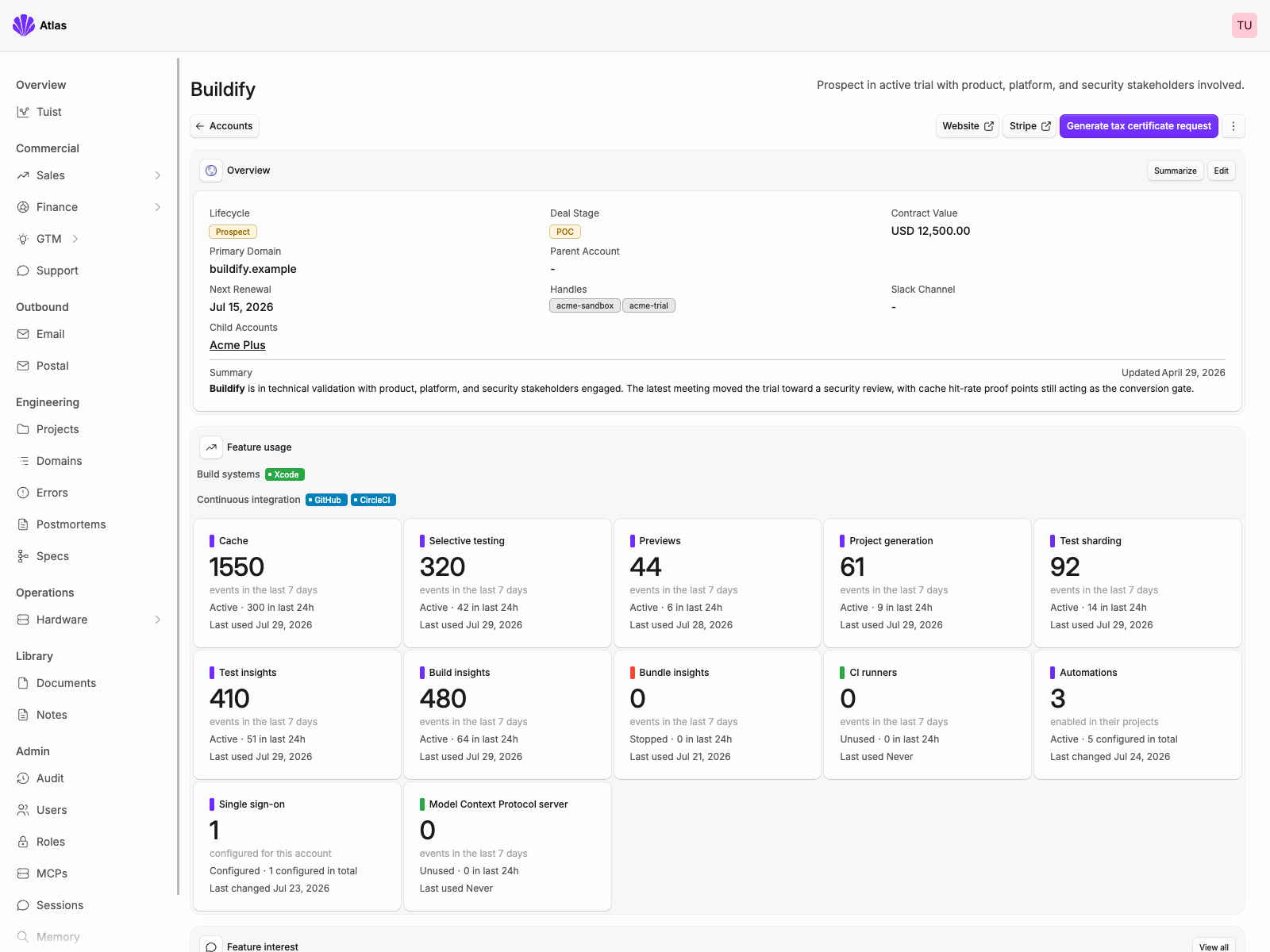
The Buildify account and all data in this screenshot are fictional, created only to illustrate the interface.
Finances: understanding costs, cash flow, and runway
From there, we moved to understanding our finances. We don’t have infinite money, so knowing where it goes is crucial. To our pleasant surprise, our banks exposed APIs, so we integrated with them to sync transactions and have agents classify them as they arrive.
That classification helps us understand our cost structure, spot opportunities to save, and keep track of the things that matter when you’re small: how much money you spend each month, how long your cash will last, and where you can afford to invest next.
Atlas can be operated entirely without the dashboard. Everything we can do there is also accessible to agents, so most of our operations these days happen through Claude or Codex. Understanding something or making a decision often starts with a conversation, with the agent pulling the relevant information from Atlas.
We also connected it to Slack through a bot, drawing inspiration from Shopify’s River, so we can have those conversations together. Alongside that, we get notifications. For finances, there’s a weekly pulse that helps us see whether things are going well or whether we’re drifting in a direction we should pay attention to.
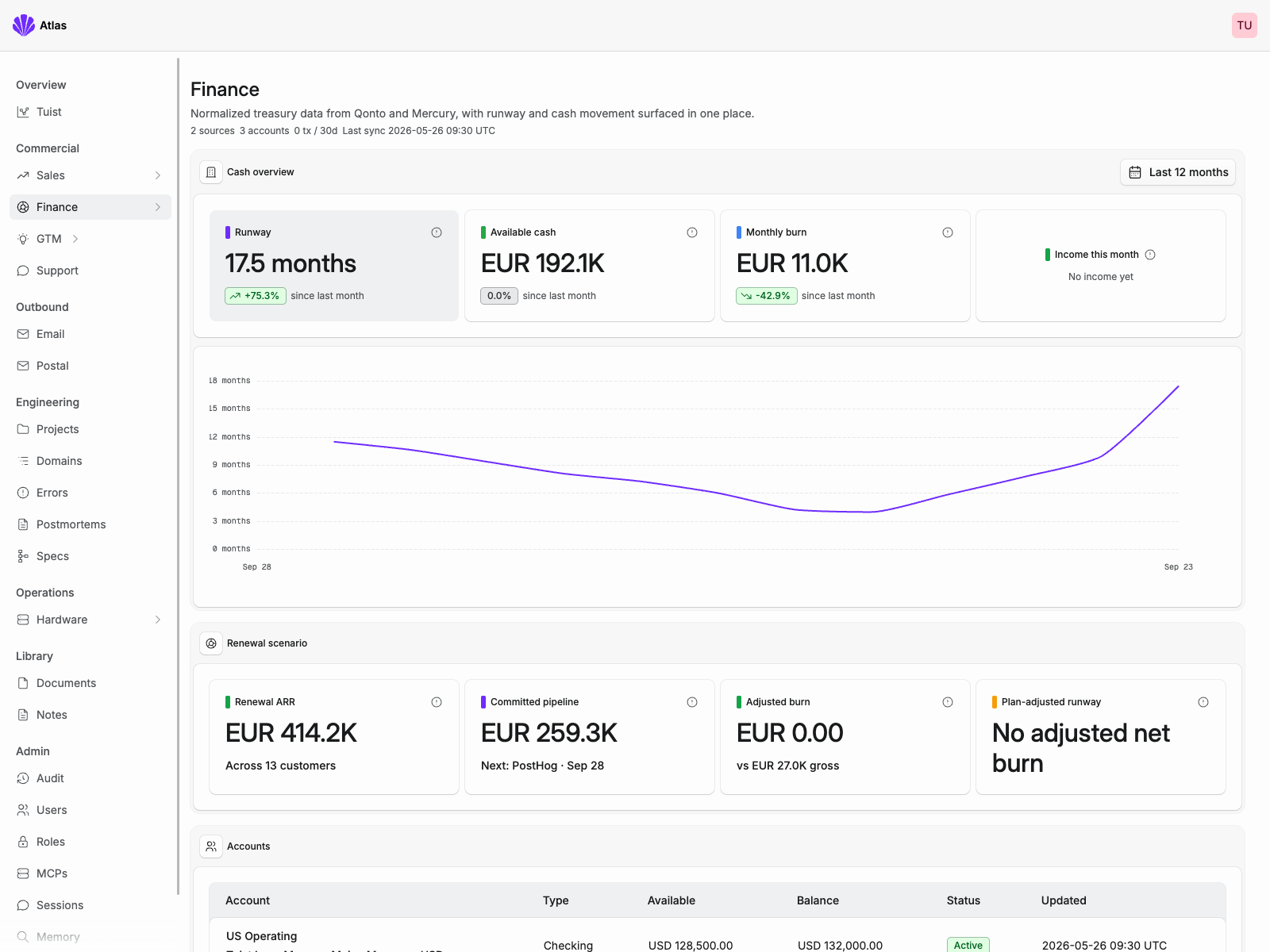
The finance data in this screenshot is fictional and exists only in the local Atlas development environment.
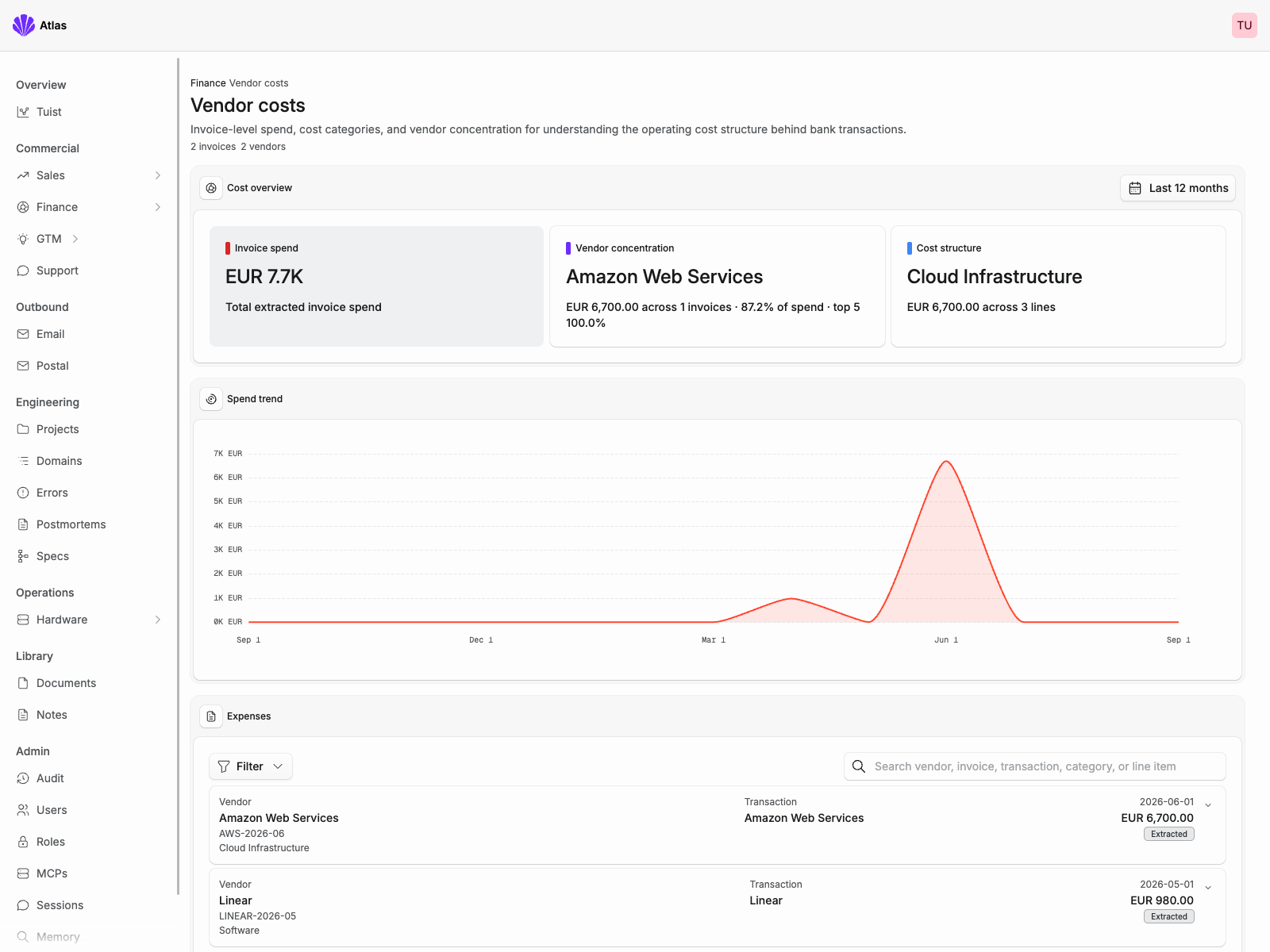
The vendor and invoice data in this screenshot is fictional and exists only in the local Atlas development environment.
Support: conversations connected to customer accounts
We have three main routes for support. The first is through our community spaces: Slack, the community forum, and issues in our GitHub repositories. We monitor those actively, and recently added GitHub notifications in Slack to help us stay on top of requests.
Then there are Slack Connect channels with enterprise customers. Those give us a direct way to hear about problems and act on them. At our current size, we can often move from a conversation to a fix and deployment quite quickly. We want people to know what’s happening with their request and keep that loop as short as we can.
The third route is email or the message box in the browser. We previously used a dedicated support tool that brought those into one inbox. We brought that model into Atlas and connected it to the rest of our context. Support threads now belong to accounts, so we can follow the relationship and find information that helps us move the conversation forward.
We can also respond to and resolve threads through MCP tools. As I mentioned earlier, most of our interaction with Atlas happens through Claude or Codex, so it’s common to start the day by asking an agent to walk through support requests one at a time and discussing how to handle them. The cool thing is that I can do this on the go, with the app on my phone connected to the same server.
Agents can help with the first pass, too: this looks like spam, this might be a known issue, here’s what I’d suggest. I love it. And because we control the experience, Asmit designed the browser component people use to contact us with our own design system. Isn’t that amazing?
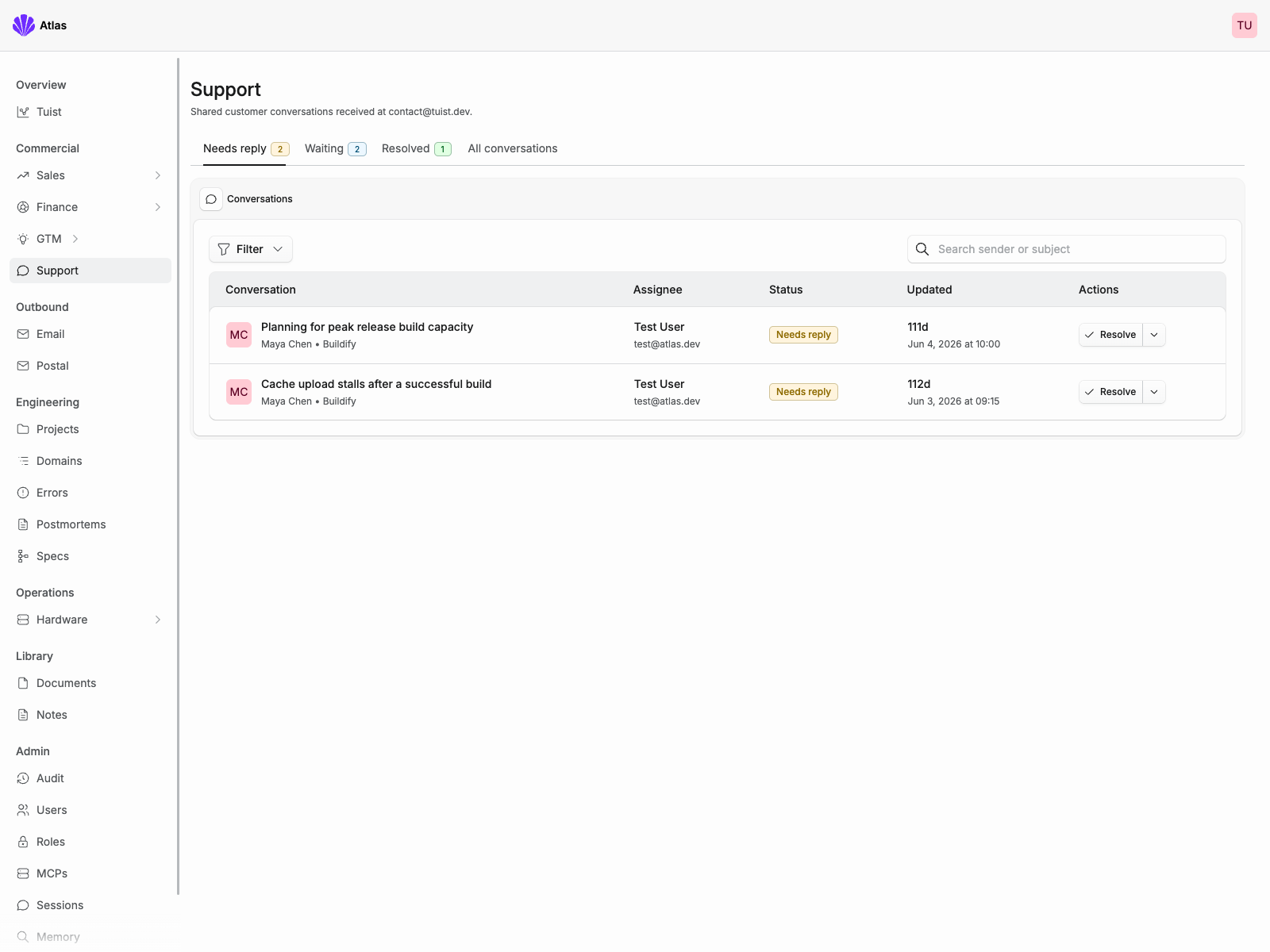
The support conversations and customer data in this screenshot are fictional and exist only in the local Atlas development environment.
Support reply sent
A reply was sent by Pedro Piñera Buendía.
Email: customer updates from shared context
We don’t send many emails beyond transactional ones from the main application, like verifying an email address. But sometimes we need to notify customers affected by an incident, tell customers hosting Tuist themselves that they need to update, or share news with people who asked to hear from us. For those updates, we try to keep things brief, personal, and straight to the point. That’s the kind of email we like receiving ourselves.
Guess what, we were using a separate solution for this, so we moved it over. We have two kinds of audiences. In one, addresses are added manually, either by us or by people signing up through a form. The other is generated from criteria, like all enterprise customers or everyone hosting Tuist themselves.
Because Atlas can combine its own data with data from Tuist, it can build those audiences directly. We don’t need to maintain another copy of customer state just for sending emails. That makes it possible to iterate on a digest with Claude and send it through an MCP tool, or prepare an update for customers affected by an incident while discussing the incident itself. The context is already there. There’s no copying and pasting between tools, and I think that’s beautiful.
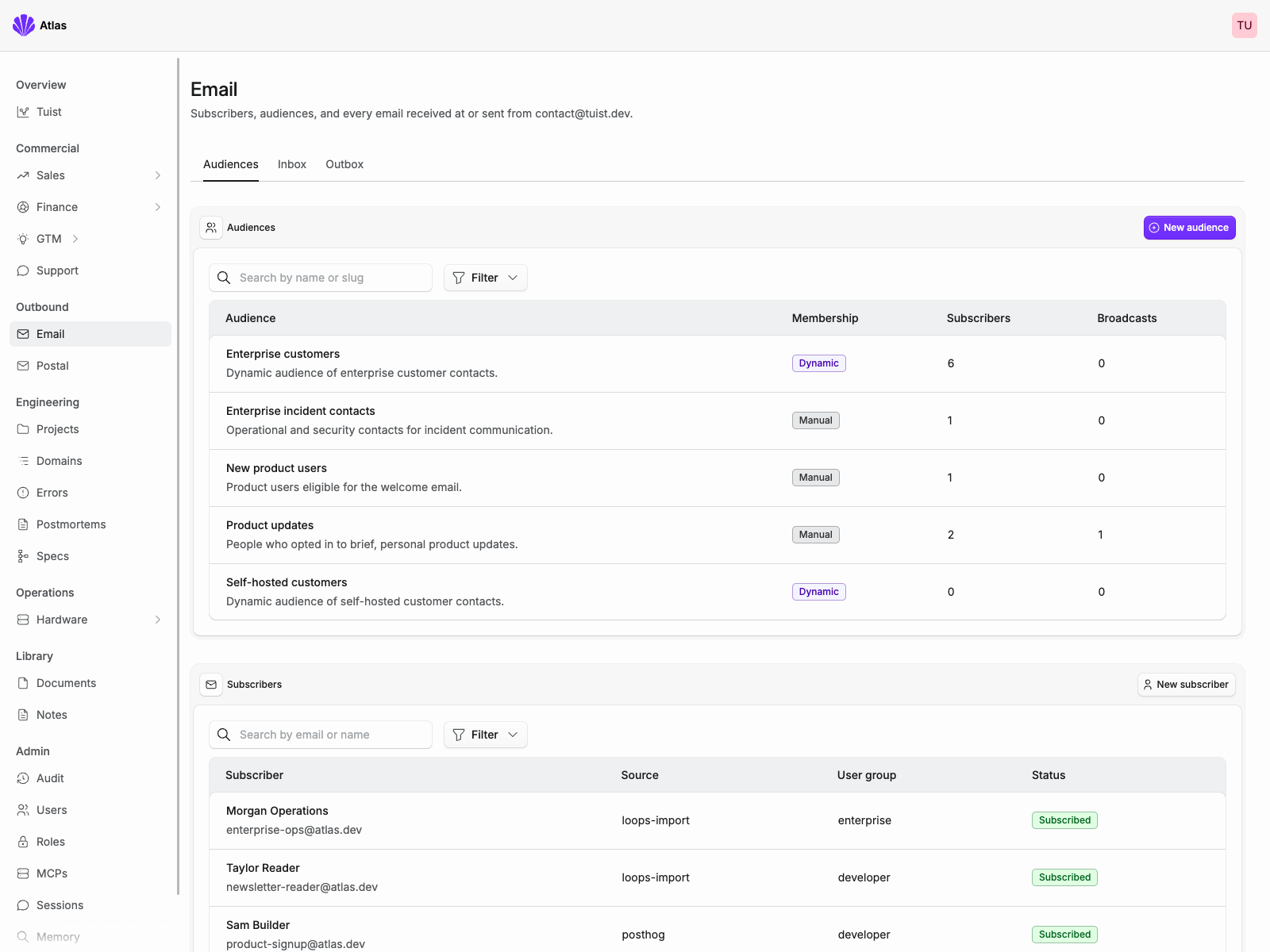
The audiences and subscribers in this screenshot are fictional and exist only in the local Atlas development environment.
We also have another delivery feature in Atlas called “Postal,” which is a little reflection of life in Germany. We can send postal letters through MCP. Crazy, isn’t it? When correspondence needs to happen on paper, we can handle that from the same place. The smell of paper, the opening of the envelope... we get to bridge the digital and physical worlds, too.
Engineering: errors, specifications, and incident postmortems
You might have seen people talking about software factories, with agents coordinating and delivering software autonomously. We’re exploring where that fits our work. Some tasks seem well suited to automation from beginning to end, like investigating a slow-query alert from Grafana or a small issue reported on GitHub.
For larger features, we remain very hands-on. We run sessions locally and are working towards letting them outlive the environment where they started, using our own compute infrastructure. Our focus inside Atlas has been gathering the data that helps us act on engineering problems, whether we act ourselves or delegate part of the work to an agent.
The first piece was errors. We use Sentry’s client libraries in our apps, so we implemented the receiving side of their protocol and added the schema we needed to store errors in ClickHouse. We also brought the alerts into Slack.
Having that information close to our customer data lets us connect an error to the accounts it affects. That helps us prioritize the fix and tell the customer when we’ve resolved something they encountered. The connections make the data more useful.
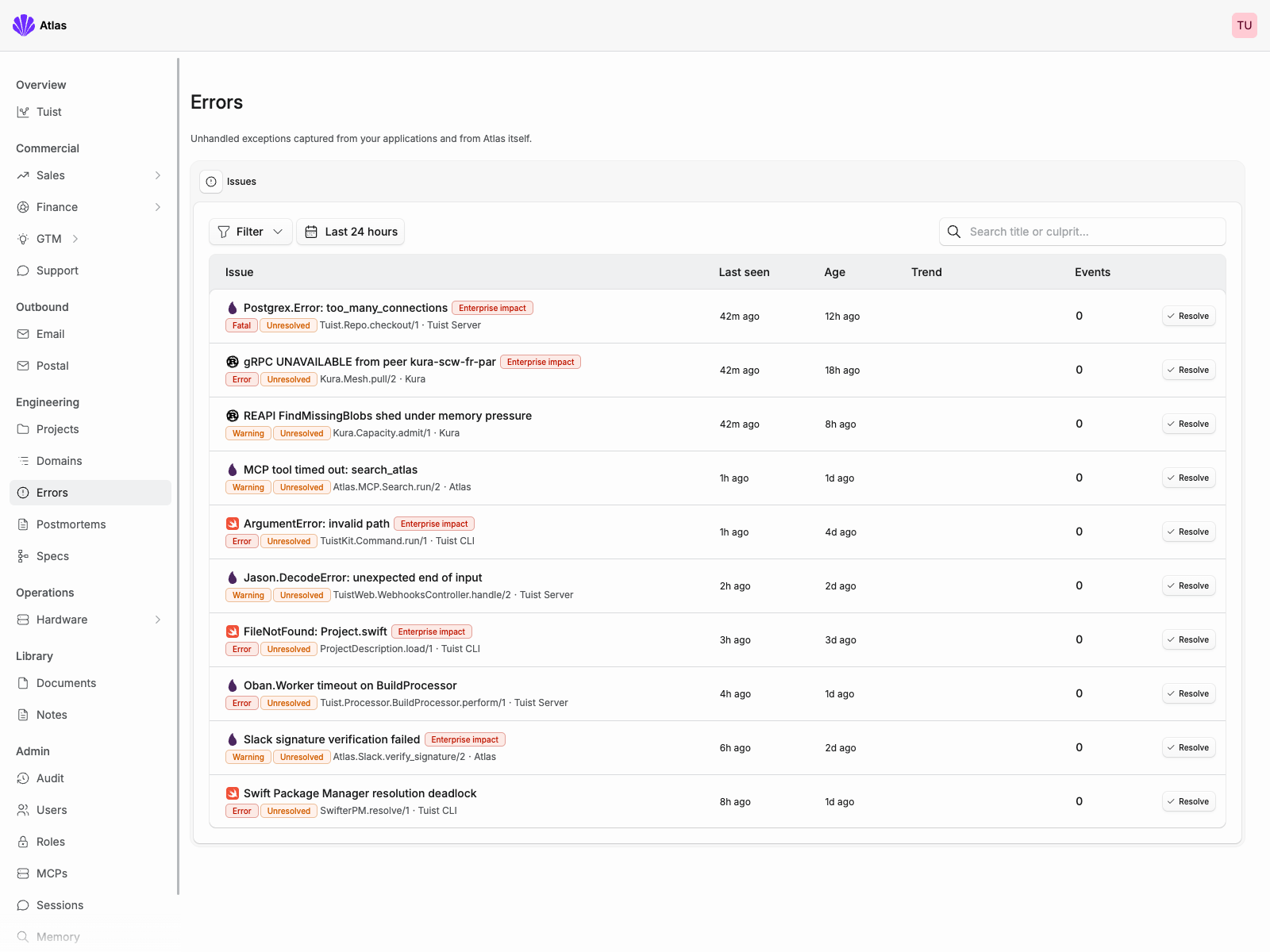
The issues and enterprise-impact indicators in this screenshot are fictional and exist only in the local Atlas development environment.
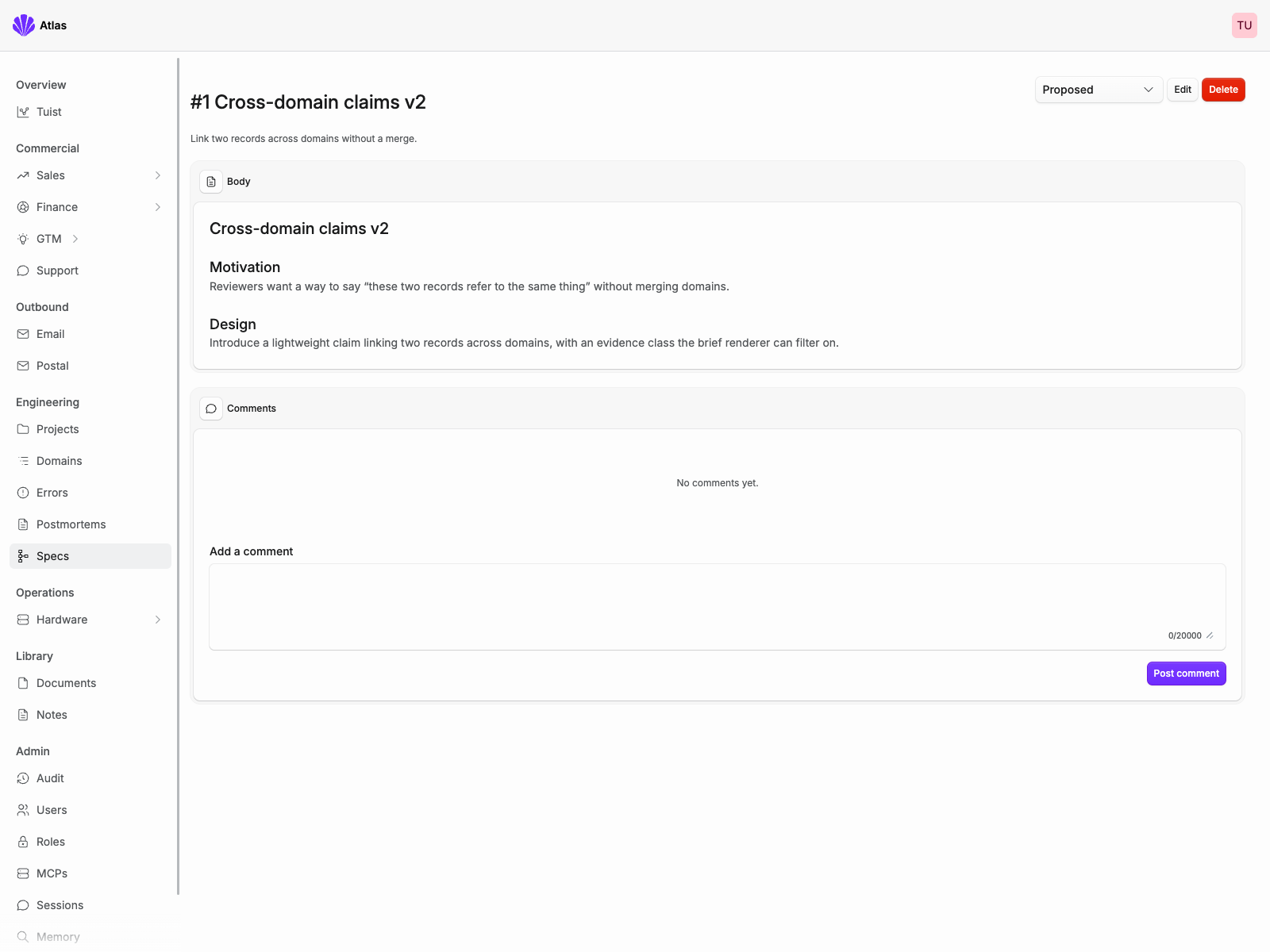
For larger pieces of work, we use specifications, or specs, to align on a major decision. The format is simple: a body, comments from the team, and a state. We also generate embeddings, numerical representations of the text that help us retrieve it by meaning, so we can come back later and find the reasoning behind a decision.
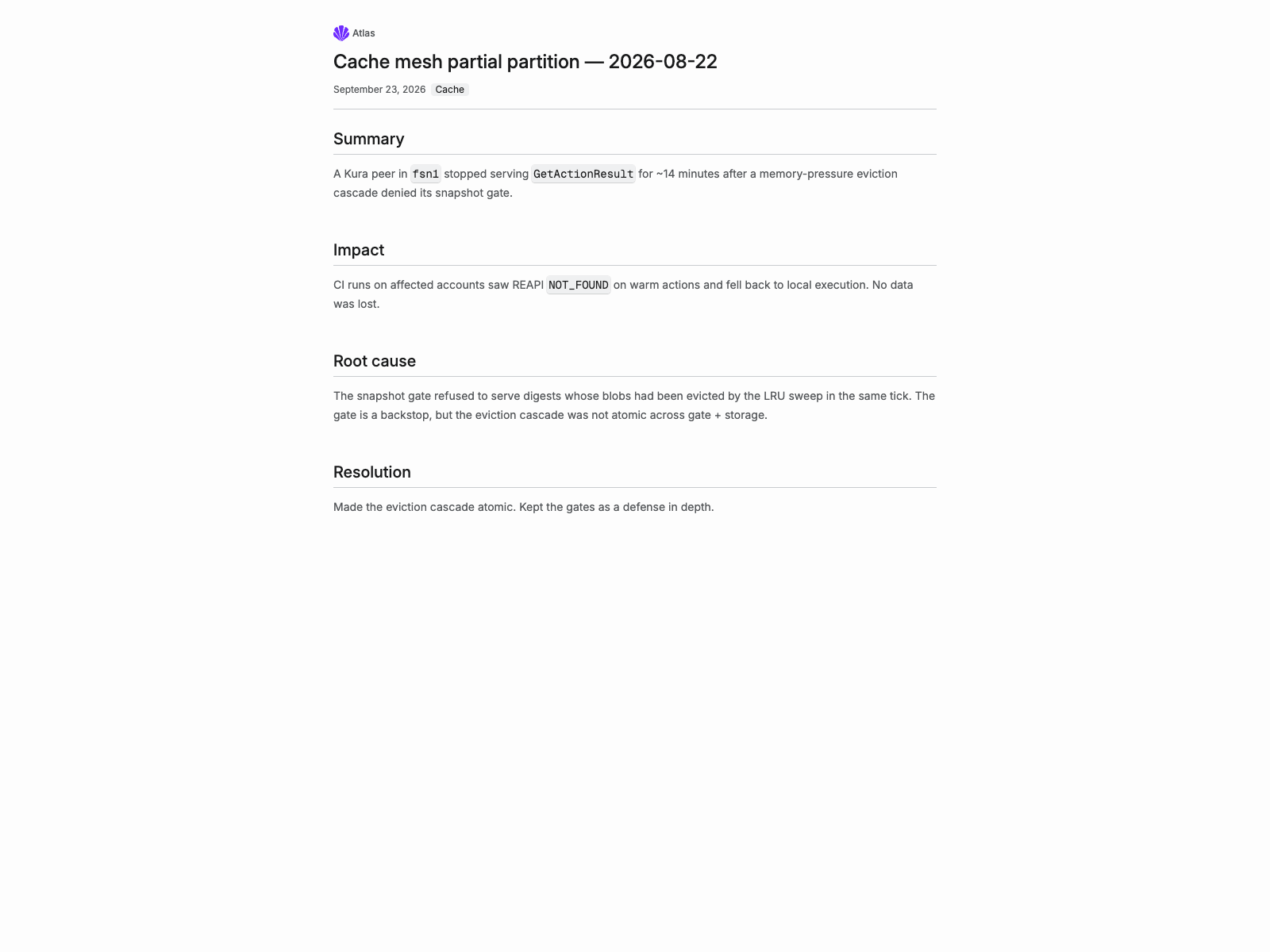
And sometimes shit hits the fan, and we have an incident. We write a postmortem and share it with the people affected. Guess how? Through our email feature. Postmortems have an internal view and a public page we can share with customers, covering what happened, how we got there, how we detected it, the timeline, and the actions we’re taking to prevent a recurrence or detect it earlier.
You might have noticed that we haven’t added a task-management system. We used one before, with milestones, projects... you name it. But many of our requests now become a prompt, then a pull request, then something we merge and ship. For that work, we haven’t felt the need for another place to move items around.
We know this will need to evolve as the volume of requests grows. Right now, we imagine it more as a queue, with priorities informed by the type of request and who needs it. A queue feels like a good starting point for how we work today.
Hardware: inventory, data center locations, and financing
When we started the company, our hardware inventory was small: a couple of laptops used by the team. As we started planning hardware deployments in data centers, we needed to track more than the machines themselves. We needed their locations, financing arrangements, payment and interest breakdowns, and insurance.
I didn’t spend much time looking at other solutions for this one. What we needed was a set of tables and interfaces around them, connected to information we already had in Atlas, so I went straight into building it there. We can now register hardware through MCP, together with its financing documents and insurance.
Each device has a unique identity. As with customers, we want to associate its history and telemetry with that identity, so we can understand how a particular machine has been behaving. We’re designing the infrastructure so Atlas can collect that data and give us, and our agents, an overview of the fleet.
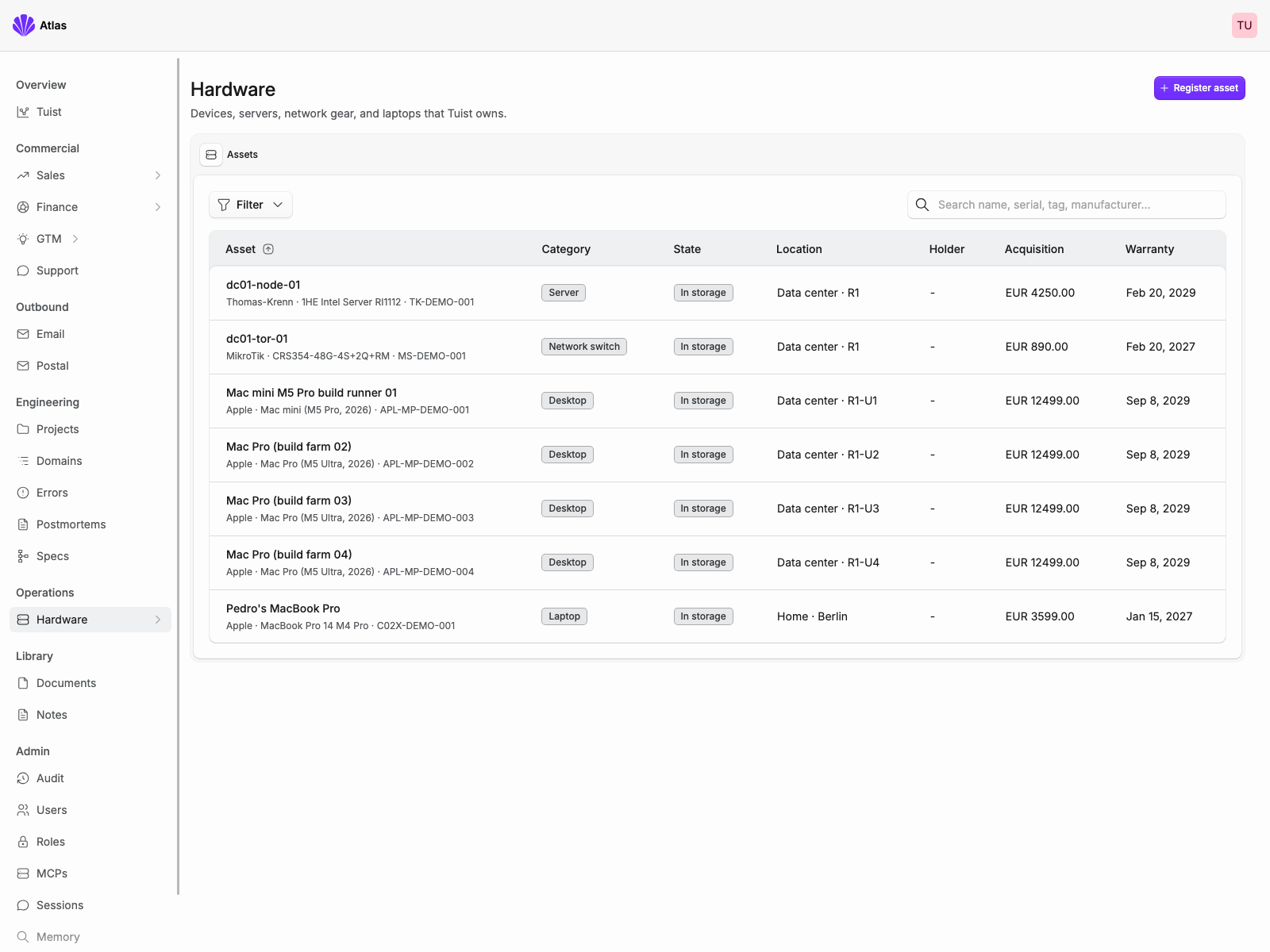
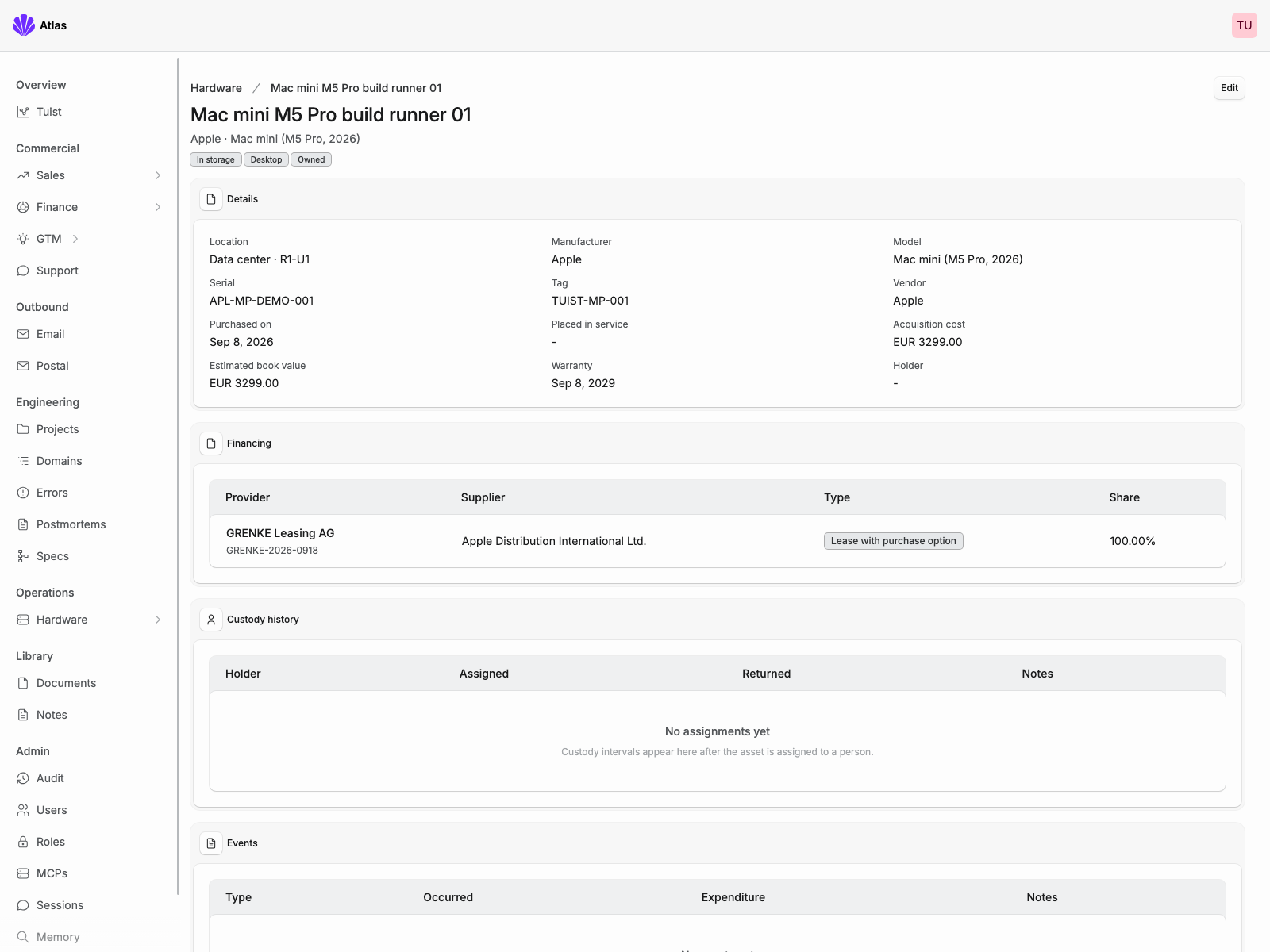
The hardware inventory and Mac mini M5 Pro in these screenshots are fictional and exist only in the local Atlas development environment.
Library: searchable documents and notes
Building a company means accumulating documents. Contracts you sign, invoices you receive... a lot of them. We wanted those documents to be part of the same system, so we built a library in Atlas with durable object storage underneath it.
Agents assign titles and classifications, and we generate embeddings to make documents easier to find by meaning. We can upload them through the dashboard, through MCP, or by forwarding an email to an inbox. When a document belongs to a customer account, Atlas associates it with that account automatically.
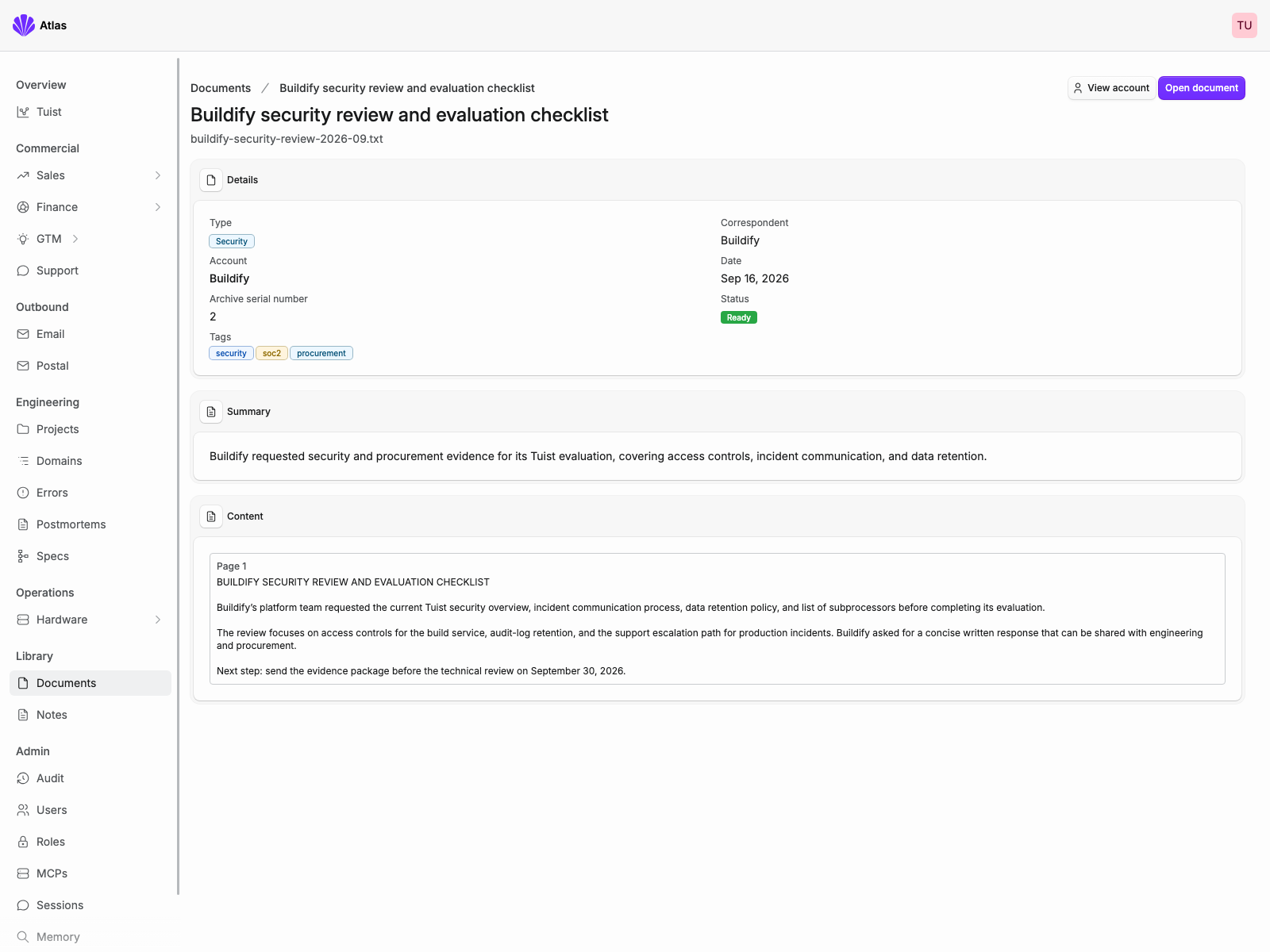
The Buildify document and its contents in this screenshot are fictional and exist only in the local Atlas development environment.
The library also has notes, which are a place to put anything we want to remember. Research on pricing or competitors, for example, or just a brain dump of ideas. Like documents, notes get embeddings so we can retrieve them later.
Model gateway: tracking translation usage and costs
As we added agent features, we needed to understand where our model credits were going. So we built a gateway for large language models. It attributes usage and cost to what we call profiles. For example, we have a “Translation” profile for our translation operations and another for operations inside Atlas.
Within each profile, we can create access tokens and track usage for each one. That lets us see both what a workflow costs overall and which integration is responsible for the usage.
Everyone still uses their coding subscription locally, which works well for the team. For these automated workflows, we use models with openly available weights through inference providers, adding credits as needed and keeping an eye on how we spend them.
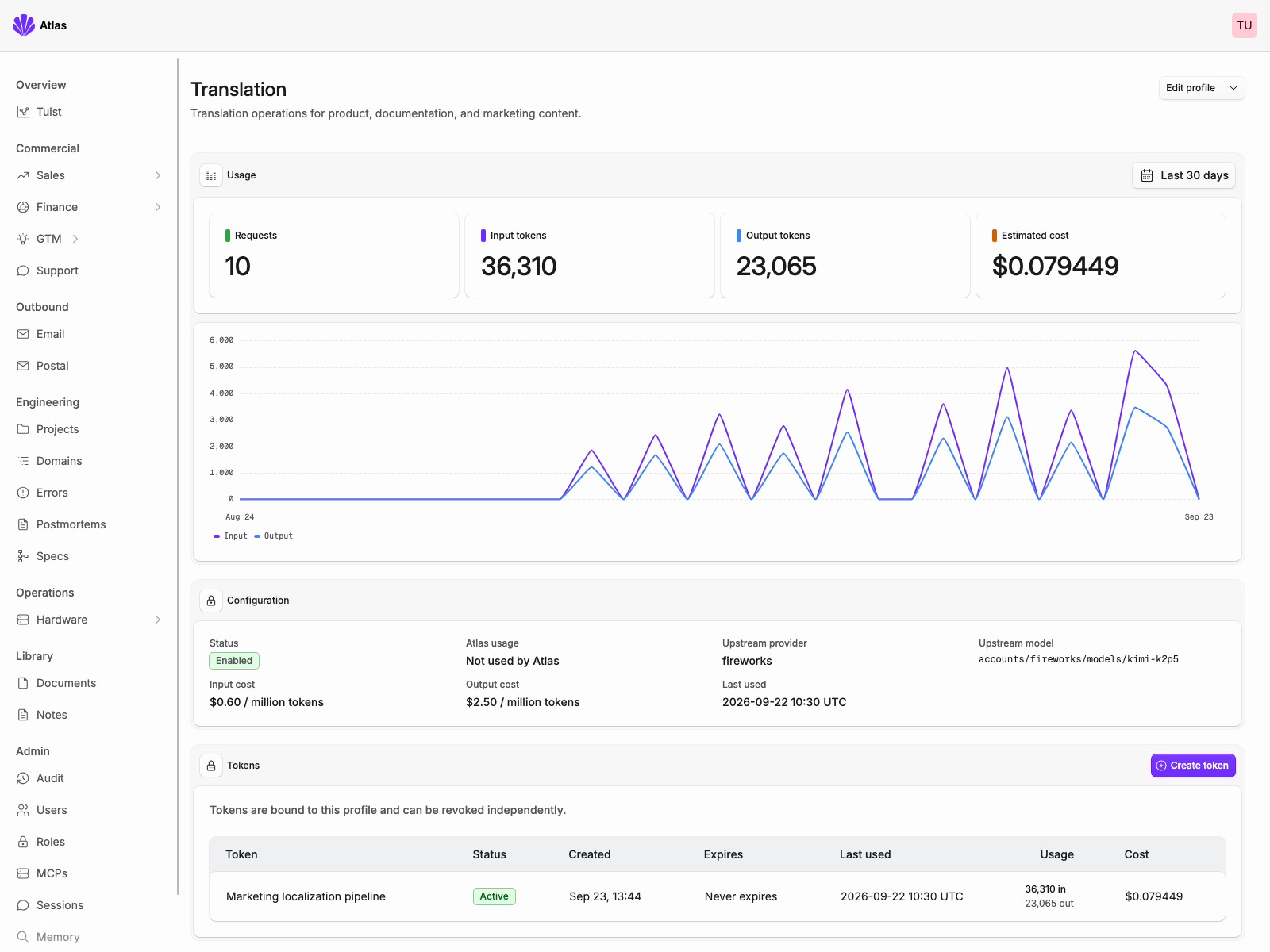
The Translation profile, token, and usage data in this screenshot are fictional and exist only in the local Atlas development environment.
Running a company of four with Atlas
But Pedro, what does a working day look like for you? I spend a lot of it with Claude and Codex, both connected to Atlas. I have sessions going through support requests while, in parallel, I write a spec to discuss with the team or investigate an error reported to Atlas.
Software lives in a broader context, and that’s where this gets interesting for me. An error is useful information. Knowing whom it affects makes it more useful. Connecting that to a service-level commitment helps us understand what we need to do next. You get the idea?
You can build those connections across several products, too. We’ve chosen to bring more of them into a system we control because it makes them easier for us to maintain and change. The value is in the context we can act on.
You might wonder how long it took to build all this. My honest answer is that the individual additions have been surprisingly quick. Just yesterday, I built the public proof-of-concept page in a few prompts. I added the hardware section in an afternoon a couple of weeks ago. Those afternoons sit on top of much longer investments in Elixir, Noora, and Kubernetes, and we owe those foundations a lot.
The source is available at tuist/tuist. Yes, we changed our minds about opening it up since the first post. It’s closely tied to our way of working, and we don’t have near-term plans to turn it into a product, although I’d be lying if I said I didn’t have a little appetite for that. I met some friends in Barcelona who had recently sold their company, and when I showed them what we’d automated through Atlas, their reaction was, “Wow, that could be a business on its own.”
A lot is changing. I think it will take years of playing with these ideas before useful, more general patterns emerge. Like leaving wine in bottles for a few years. For now, our focus is on Tuist’s users, and Atlas helps a team of four provide a better service.
We made it open source because we believe the world benefits when more of the secret sauce is shared. Much of how we operate and build technology is already in the open. It’s a way of working we believe can help others build their own businesses, and if we can do that while building Tuist, even better.
What we still use outside Atlas
There are still plenty of pieces outside Atlas. We use Stripe for payments, Slack for communication with each other and our customers, and a separate service for signing documents. Those services continue to make sense for us.
Other boundaries may evolve. We use hosted Grafana partly because it monitors a cluster that might go down, so keeping monitoring outside that cluster is useful. More of our interaction with it now happens through its MCP server and alerts, which makes me curious about how that relationship will develop.
Another area is Git hosting. I was chatting with a company that had moved to an internal solution inspired by Cursor’s post on Git at scale, and I could see why that made sense for them. Our own use of GitHub has changed as agents have become a bigger part of our work, too. We’ll keep revisiting what we need.
With so much still changing, we want clear boundaries around external services and room to replace individual pieces when it makes sense. That includes model providers and the products built around them. We’re happy to depend on a service that brings us value; we also want to preserve our ability to adapt.
So yeah, this is Atlas, and this is how we’re learning to run a company with four people. I’m proud of it because it brings us closer to the way we want to work: curious, responsive, and able to put care into the things we make.
You can probably tell that I like building and sharing. Part of this investment is about making room for that, including the time to let ideas turn into posts like this one. It’s a lot of fun to write and share.